NewFunnelforms Pro 5.0 is here: leads board, appointment booking and price calculator in one plugin.Funnelforms Pro 5.0 is here.Try free for 14 days →
Pro 5.0 features

Everything that happens between a visit and a sale .

Logic, calculators, appointment booking, leads, payments and analytics in one plugin that runs on your WordPress website.

With AI · Pro

Describe your business. The AI builds the funnel.

One or two sentences about your business and goal are enough. You get a complete multi-step funnel as a draft that you edit in the editor like any other. You change existing forms in the AI bar: “also ask for the budget”, “make it shorter”, “translate it into French”.

  • First card in the template gallery: “Create with AI”
  • Questions, paths, calculator, contact step and thank-you page in one go
  • No API key of your own
New · Predictive AI · Pro

Test your funnel before it goes live.

Predictive AI sends 10,000 simulated visitors through your funnel. Before the first real click you see how many reach the end, which question they drop off at and how much each change gains.

  • Drop-off and answers per step
  • Weak points with reasons and suggestions with calculated effect
  • More than 5,000 benchmarks from lead generation with Funnelforms
  • 3, 10 or 40 analyses a month, depending on the plan
Logic

Paths that adapt to your visitors.

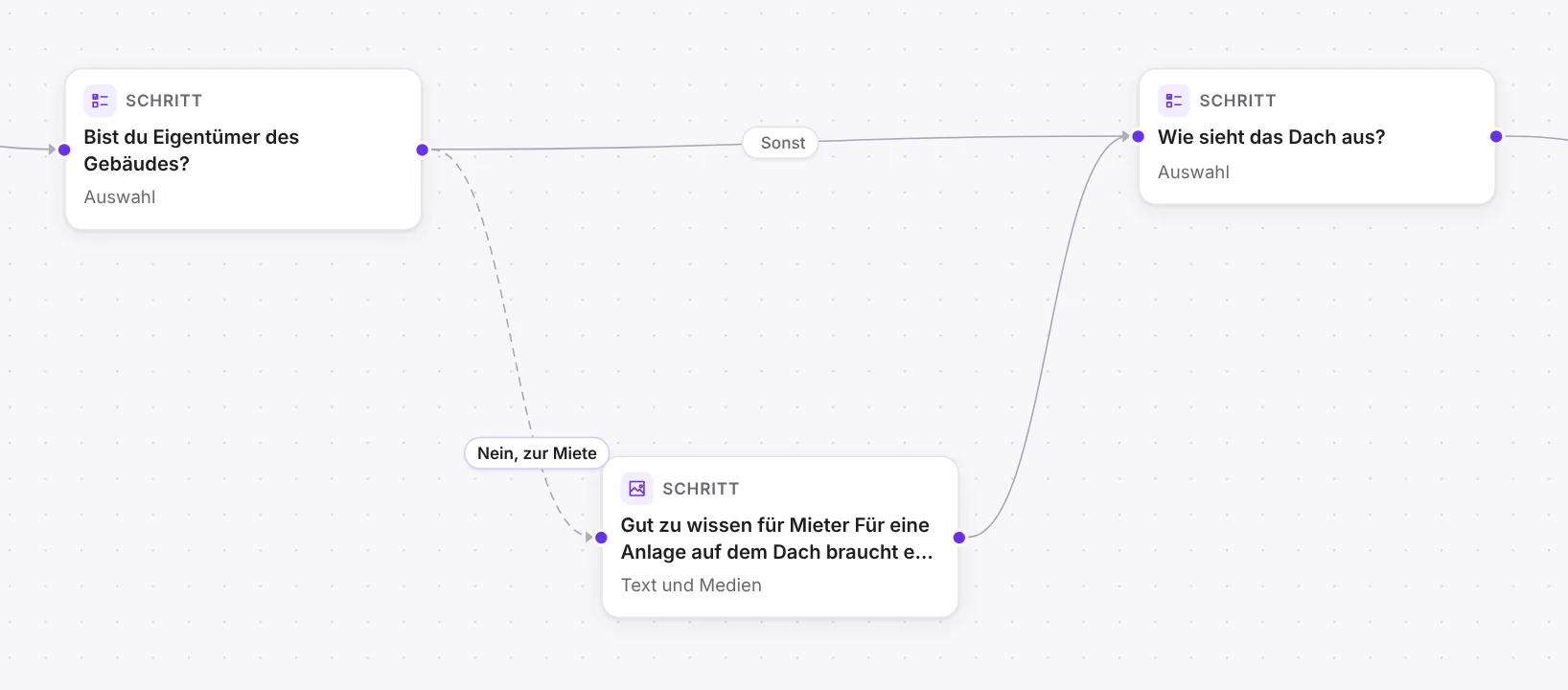
Every step is a card, every path a line. Branch by answers, numbers, text and date, combined with AND and OR.

  • Conditions with numbers, text and dates
  • Show fields only when they apply
  • Insert earlier answers into questions
  • Password, time window, time limit and continue later
Logic editor with steps as cards and paths as lines
Calculators and quizzes

Prices, quantities and points, live in the form.

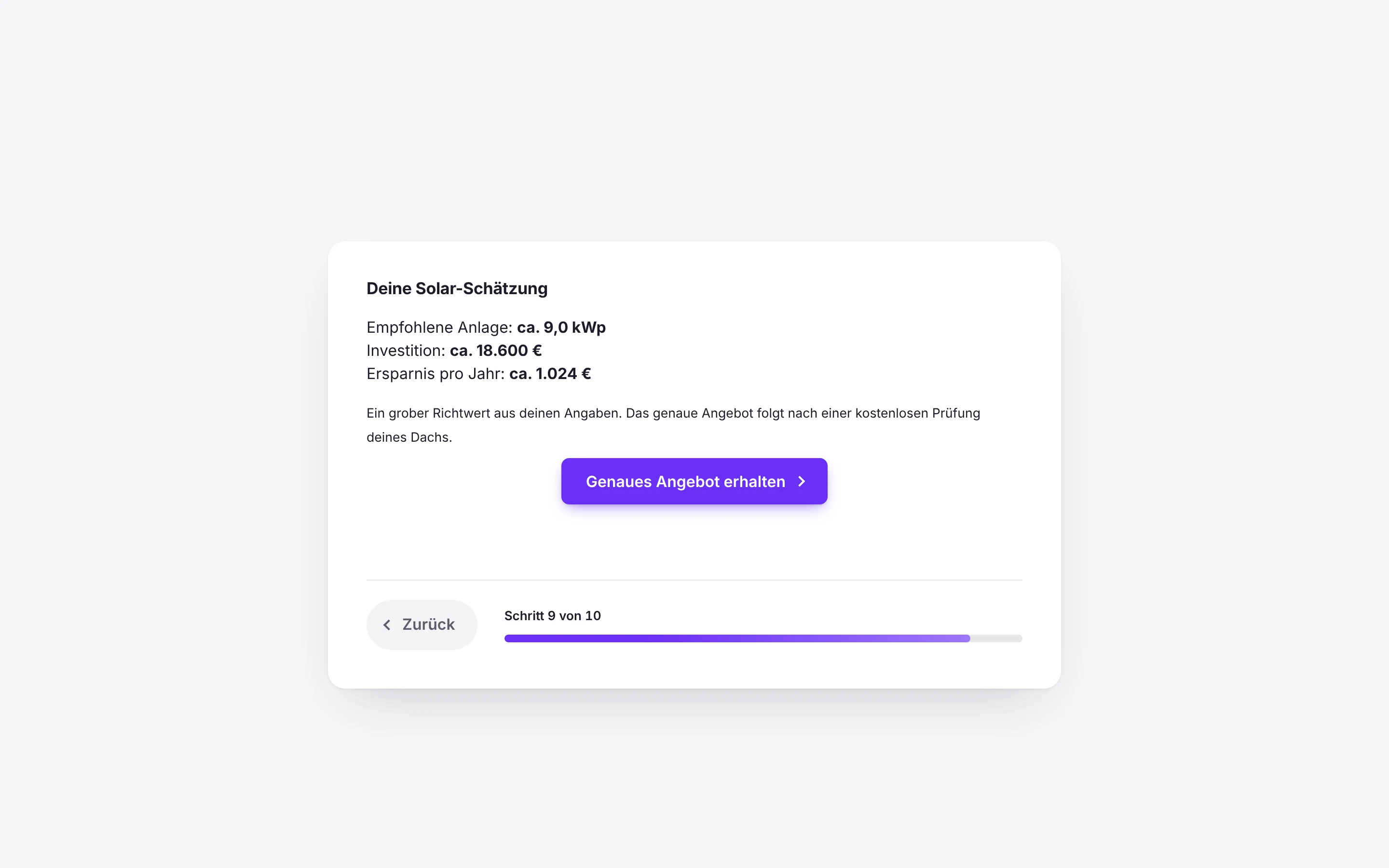
Formulas based on the answers, with decimal places and a unit like € or m². The result appears in the step, on the thank-you page, in the email and in the entry.

  • Formulas with if, min, max, round and sum
  • Lead score from the answers
  • Quizzes with points and matching results
  • Result controls path, payment and conversion value
Form with price calculator, as visitors see it
Field types

The right field for every question.

Free includes the most important fields, Pro everything quotes and appointments need.

Choice with icon or imageDropdown with searchRatingShort and long textEmailPhoneURLNumberDate and date rangeTimeText and mediaSliderProAddressProFile uploadProSignatureProAppointmentProRepeating groupPro
Design

Looks like your brand.

Colors, font, corners, spacing and icons with live preview. Save your design as a style and apply it to other forms.

  • Twelve themes, including “Match website” and “Dark”
  • Choice with icons or images
  • 24 languages, German with informal and formal address
  • Multilingual forms with WPML and Polylang

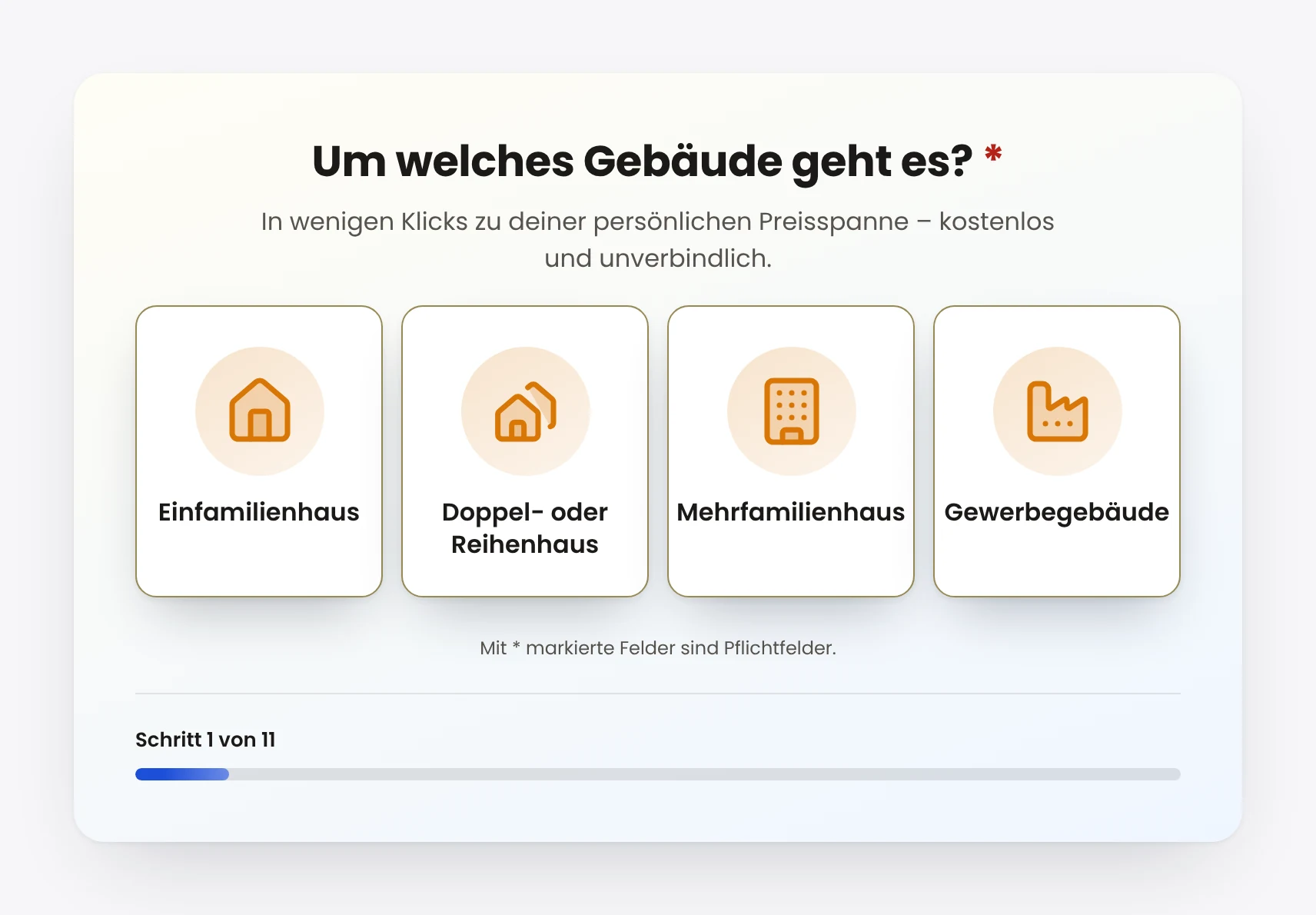
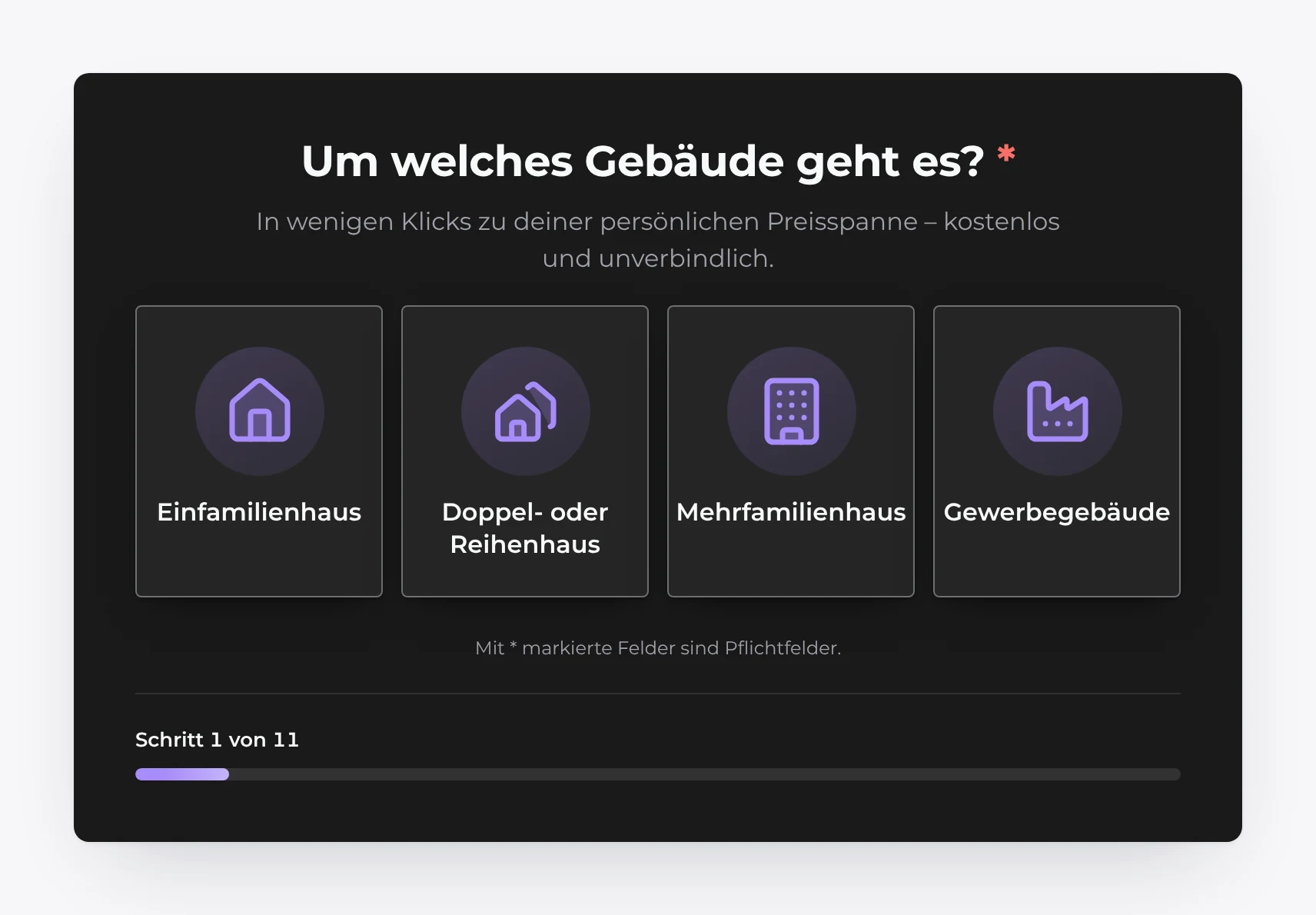
The image follows your appearance setting at the top right: light or dark.

Form in light design, as visitors see itForm in dark design, as visitors see it
Embedding

Wherever your visitors are.

As a block in the editor, via shortcode, as an Elementor widget, as a popup, as a corner button or as a standalone page with its own URL.

  • Block in the block editor and shortcode
  • Widget for Elementor
  • Popup and corner button
  • Notes for cache and optimization plugins
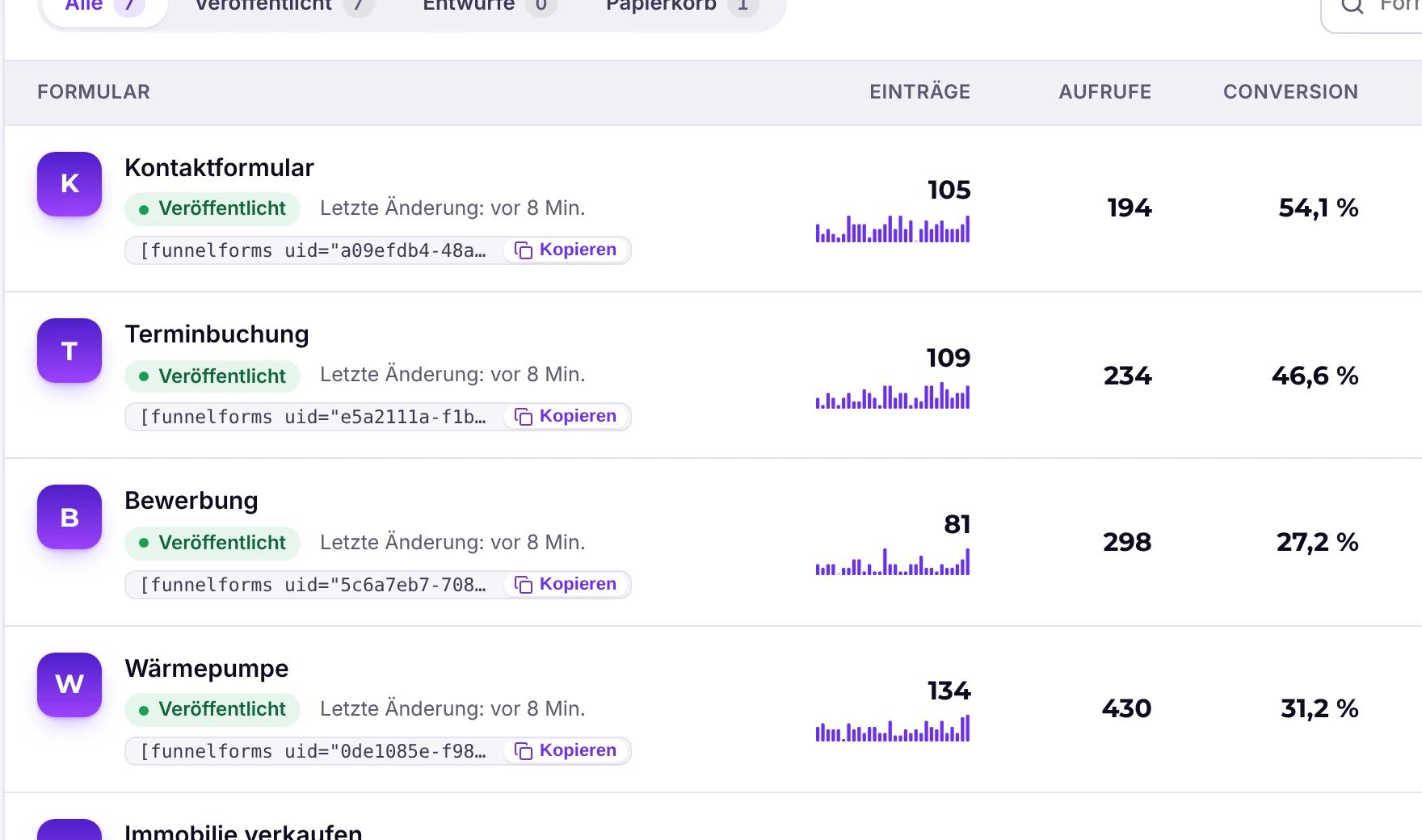
Form list with views, entries and conversion per form
Leads and CRM

Every inquiry complete, sorted and passed on.

Answers, calculation, lead score, lead value, source and notes in one entry. On the board, you drag leads through your own stages to Won.

  • Board with your own stages, status, tags and notes
  • Reminders to visitors who leave without sending
  • Lead value estimates the deal
  • Notifications via email, Slack, Teams, SMS, WhatsApp
  • Double opt-in and confirmation to the lead
  • Delete automatically after a set number of days
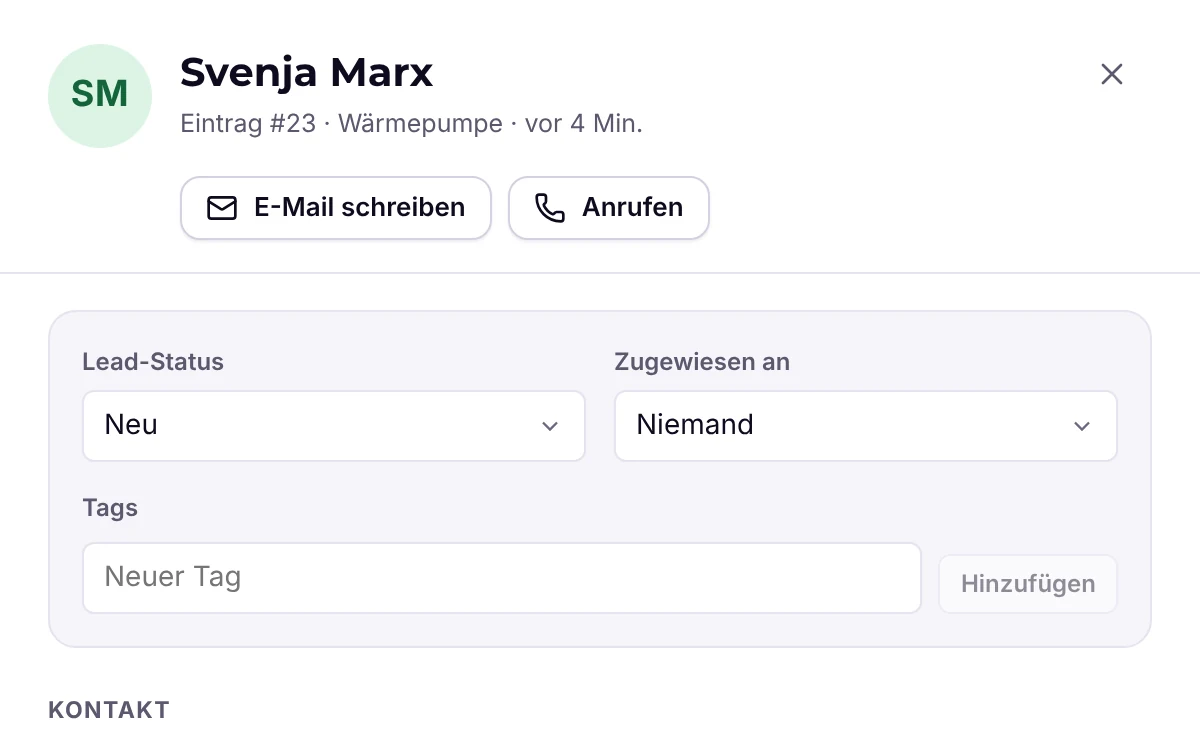
Entry with answers, status, tags and notes
Appointment booking

The inquiry becomes an appointment.

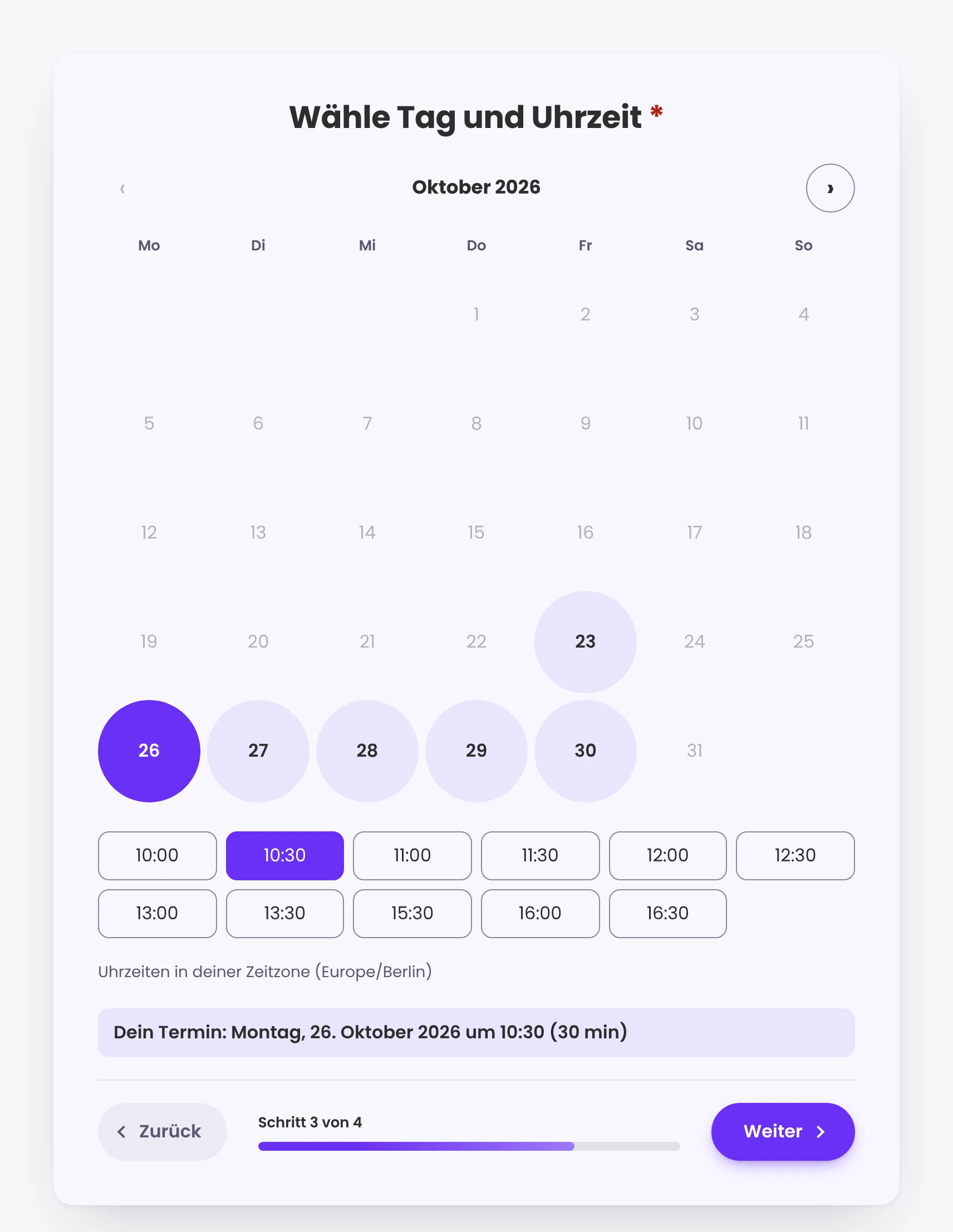
Visitors pick a day and time from your available slots, in their time zone. On submit, Funnelforms checks again so no one double-books.

  • Google Calendar, Microsoft 365, Apple iCloud, CalDAV
  • Appointment types with duration, buffer and lead time
  • Invitation with calendar file and reminders
  • Multiple people, taking turns or together
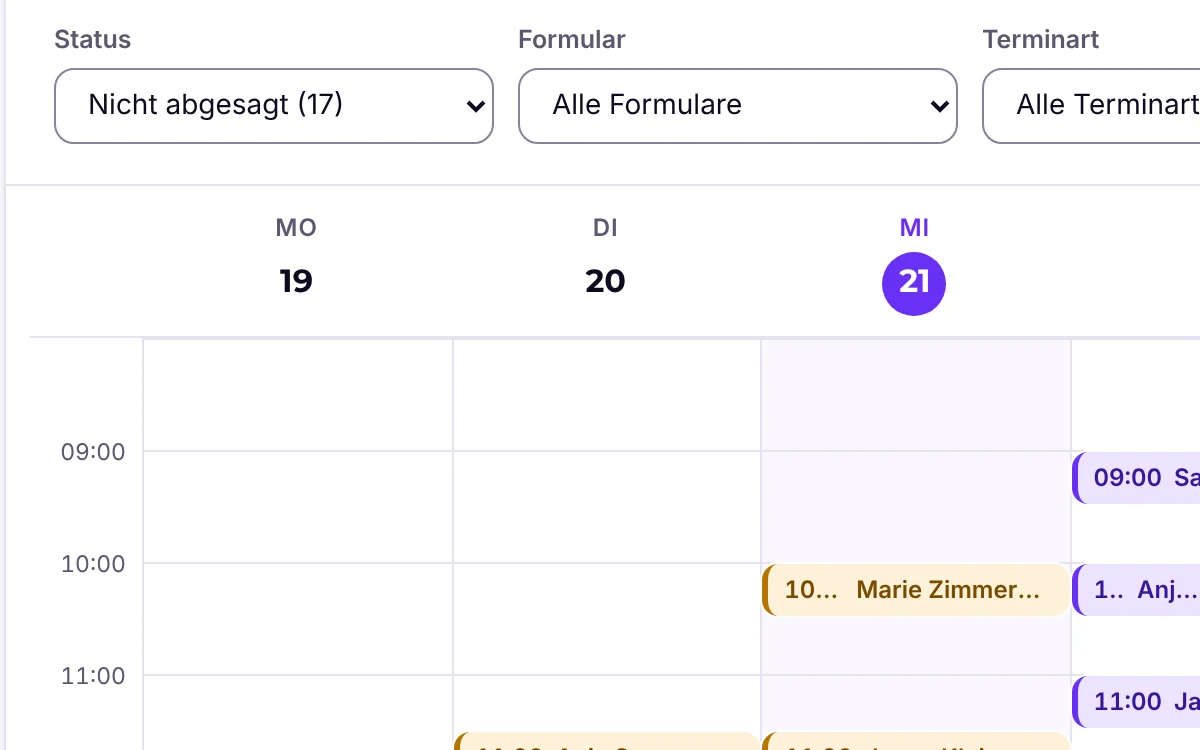
Weekly view of booked appointments
Appointment picker in the form
Payments

Take a deposit with the inquiry.

After the contact step, the visitor pays the calculated amount, a deposit or a subscription (subscriptions with Stripe). The status is shown in the entry.

  • Stripe, PayPal and Mollie
  • Fixed amount or from the calculator
  • Payment status in the entry
  • Coupons and test mode
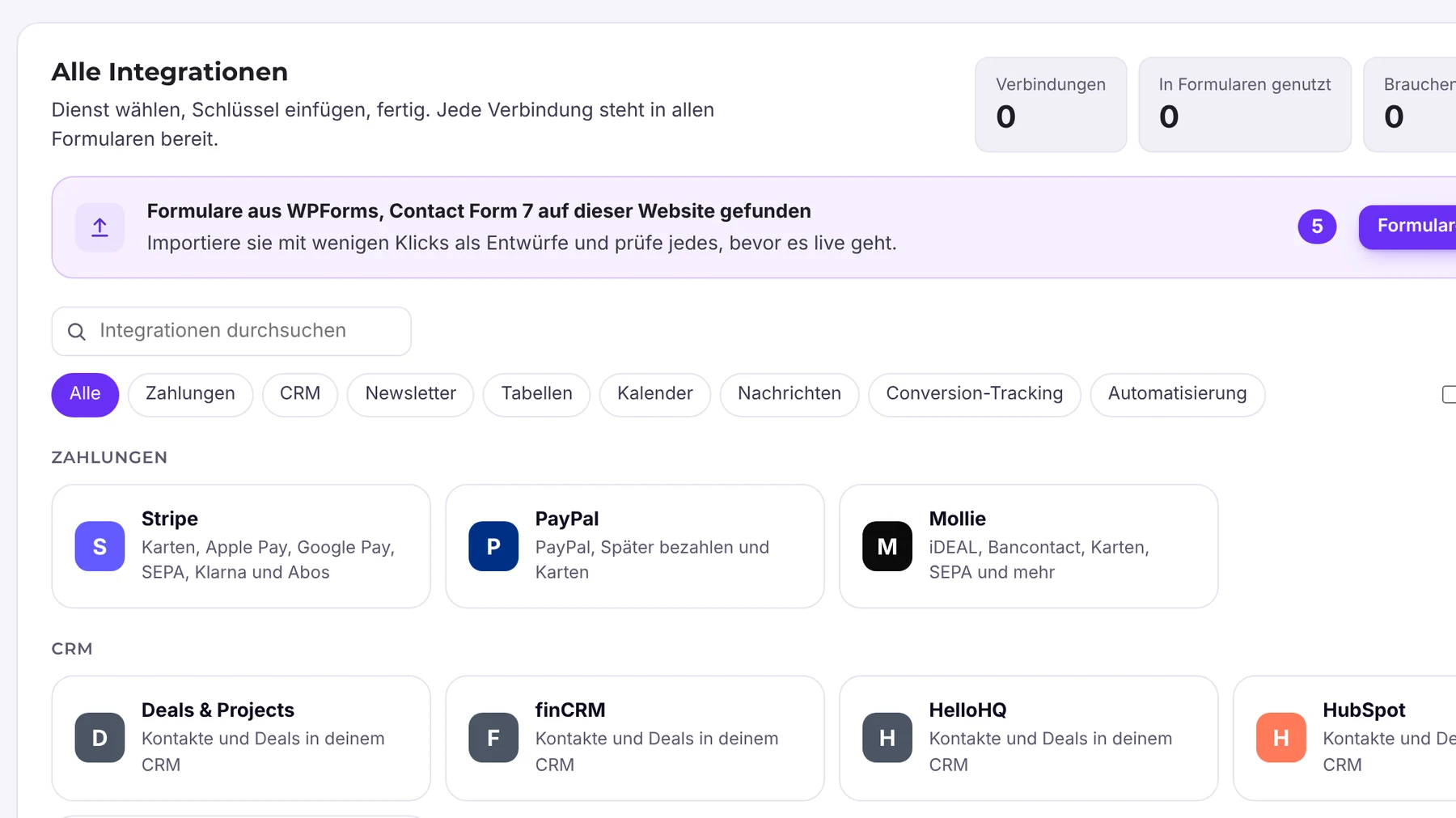
Integrations in Funnelforms Pro 5.0
Statistics

Which step is costing you inquiries?

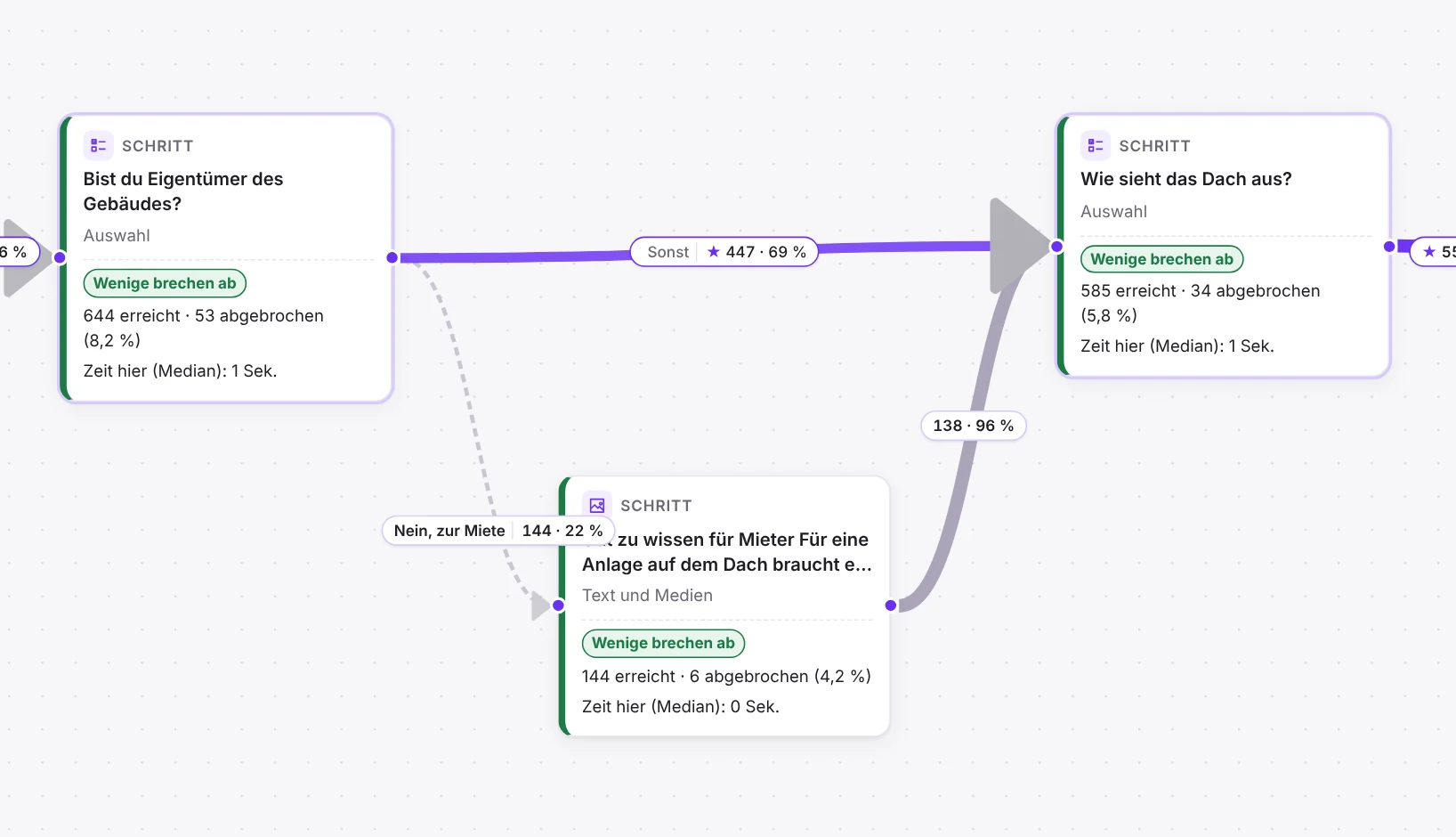
Views, starts, drop-offs per step and completion time, by source and campaign. On the canvas, you see at each step how many visitors reach it and where they drop off, and in Pro also the strongest path and the drop-off per field.

  • Conversion per form and per A/B variant
  • Channels, sources and UTM campaigns, paid clicks recognised
  • A/B tests with run time, chance to win and history
  • Export as CSV or for Excel
Logic editor with numbers per step
All features

97 features, each explained.

Everything Funnelforms Pro 5.0 can do, sorted by area. Each feature with exactly what it does. The guides are in the Help Center.

Go to the Help Center →

Setup and overview

Onboarding takes you straight to your first published form.

Setup assistant

Free and Pro

After installation, the assistant guides you step by step to your first published form.

  • Required after installation, can be paused with “Continue later”
  • Path for new customers: region and language with privacy, goal, brand, preview, go live
  • A dedicated path for those switching from Funnelforms 3: transfer data, select, compare, go live
  • Asks how long entries are kept, and creates the form on a new page or gives you the shortcode

Overview

Free and Pro

On the overview, you see at a glance what happened in the last 30 days.

  • “Setup” checklist with progress, every open item is a link
  • Key figures: forms, views, entries and conversion rate
  • Top forms, latest entries and views and entries over time
  • Same header on all Funnelforms pages

Switch from Free to Pro

Free and Pro

You start with Free and switch to Pro later without rebuilding anything.

  • Free has no limits on forms, steps, fields and entries
  • Activating Pro deactivates Free; forms, entries and settings stay
  • Pro features show in Free with the “Pro” badge in the editor and can be used only with Pro
  • Free does not display forms with Pro features that change the flow (e.g. calculation, payment)

Editor and structure

In the editor, you build your form's flow on a canvas and publish it when it's ready.

Canvas with steps as cards

Free and Pro

You see the whole flow: every step is a card, every path a line.

  • Add questions, contact steps and final steps on the left, properties on the right
  • Workspaces Build, Design, Settings and Embed
  • Overview card, keyboard shortcuts and a short tour on first launch
  • Copy steps and fields with Ctrl+C and Ctrl+V, into another form too

Steps, multiple fields and progress bar

Free and Pro

You decide which questions go in which step and show visitors how far along they are.

  • Multiple fields in one step, sorted with “Move up” and “Move down”
  • Final steps: Contact step (submits the entry) and End
  • Progress bar with “Step … of …”, with percentage if you want
  • Start, Unreachable and Dead end badges on the canvas

Answers with icons and images

Free and Pro

You design choice questions as tiles with icons or your own images.

  • Icons from the Lucide set, searchable in German and English
  • Images from the media library, layout as tiles or list, adjustable size and position
  • Sort answers by dragging, or add many at once with “Paste list”
  • Pro only: a number per answer for calculations and “Correct” for a quiz

Templates

Free and Pro

You start with a ready-made template for your goal and your industry.

  • 98 templates in Pro, 37 of them without Pro features in Free too
  • Filter by nine goals and twelve industries, search in answers too
  • Choice of language: German (informal or formal address), English, Spanish, French, Italian
  • Preview every template as a test run on desktop, tablet and mobile

Saving, publishing and versions

Free and Pro

Your changes are saved automatically; visitors only see what you publish.

  • Auto-save as draft, undo and redo
  • Publish with a check and an optional note
  • Load earlier versions or discard changes
  • Lock while someone else is editing the form, with “Take over”

Preview and form list

Free and Pro

You test every form before publishing and see in the list how it's performing.

  • Preview on desktop, tablet and mobile as a test run
  • List with views, entries and conversion for the last 30 days per form
  • Search, duplicate, export, import and trash

Field types

For each question, you choose the right field; Free brings the basic fields, Pro the fields for quotes and orders.

Choice, dropdown and rating

Free and Pro

Visitors click their answer instead of typing.

  • Choice with one or more answers, minimum and maximum number, optionally advances automatically
  • Dropdown with a search field above the answers
  • Rating as stars, numbers, color scale or faces

Input fields

Free and Pro

For everything visitors enter themselves.

  • Short and long text with minimum and maximum length
  • Email address, phone number, URL and number with limits
  • Date, also as a from–to range, and time in your own interval
  • Phone number with country picker

Text and media

Free and Pro

A step without a question for notes, images, videos or a loading screen.

  • Text with image or video
  • Continue via button, after a delay or as a loading screen with animation

Slider

Pro

Visitors pick a number or a range on a slider.

  • Minimum, maximum, step size and starting value
  • Range with two handles
  • Unit before or after the number, number can also be typed in

Address

Pro

Visitors enter their address, optionally with suggestions and a map from Google.

  • One field, or split into street, house number, ZIP code, city and country
  • Suggestions, map and location button with your own Google Maps key
  • In EU privacy mode, Google Maps only loads after consent

File upload

Pro

Visitors send photos, plans or documents right along with it.

  • Up to 20 files, maximum file size in MB configurable
  • Restrict allowed file types, e.g. pdf, jpg, png
  • Files are stored securely and can only be accessed with the “View entries” permission

Signature

Pro

Visitors sign right in the form.

  • Sign with mouse or finger, custom pen color
  • Optionally upload an image of the signature
  • Appears as an image in the entry's PDF

Repeating group

Pro

Visitors fill in a group of fields several times, such as one row per person.

  • Minimum and maximum number of items

Fields in the contact step

Free and Pro

In the contact step, you ask for contact details and submit the entry.

  • Salutation, name, email, phone, text, list, checkbox, consent and captcha
  • Email field optionally restricted to business addresses
  • HTML field in Pro only
  • Pro: confirm the phone number with a text message code

Design and languages

Your form looks like your brand and speaks your visitors' language.

Customize design

Free and Pro

You adjust colors, font, corners and background to your brand and see the result instantly.

  • Twelve themes to start from, including “Match website” and “Dark”
  • Fonts built in, uploaded or from Google Fonts
  • Sizes, spacing, borders, shadows, gradient or image backgrounds, transitions
  • “Hard to read” warning when contrast is too low

Saved styles

Pro

You save a design once and apply it to other forms.

  • “Your styles”: save your own designs
  • Apply a saved style to other forms

Copy the design from a website

Pro

Funnelforms reads a website's colors and font and applies them.

  • Enter a page's URL, and its colors and fonts are read automatically
  • No data about you or your visitors is sent

Custom CSS and JavaScript

Free and Pro

For special requirements, you add your own code.

  • Custom JavaScript on the contact step and the thank-you page, in Free too
  • Pro: custom CSS in the design
  • Custom code needs the WordPress capability for unfiltered HTML

Multilingual forms

Pro

One form, several languages, without copying it.

  • Add languages and translate texts per language
  • Shows how many texts are still missing per language
  • Visitors choose the language themselves; with WPML or Polylang, the form follows the page

24 languages

Free and Pro

Forms in 24 languages, with buttons and messages in the same language.

  • German with informal or formal address, plus Austria and Switzerland
  • Ready-made templates in German, English, Spanish, French and Italian

Logic and paths

Each answer takes your visitors to the right next question.

Paths by answer

Free and Pro

Each answer of a choice or dropdown gets its own next step.

  • One destination per answer in the Logic tab
  • “Otherwise go to” for all other visitors

Rules with AND and OR

Pro

You branch by numbers, text, dates and results, not just by a single answer.

  • Conditions on number, slider, rating, text, date, address, upload and more
  • Groups like “A and (B or C)”
  • Rules based on the result of a calculation

Show fields only for certain answers

Free and Pro

A follow-up question only appears when it fits, for example with “Other”.

  • “Show this field”: Always or Only if …
  • Free: one condition “answer chosen”
  • Pro: several rules from answers above or from earlier steps, all or any of them
  • Hidden fields are not required and send nothing

Logic check

Free and Pro

Funnelforms shows you errors in the flow before visitors find them.

  • Finds dead ends, unreachable steps, rules that never apply, and loops
  • Badges right on the canvas
  • “How visitors get here” on every final step

Insert earlier answers

Free and Pro

You address visitors with their own answers, such as their name.

  • Free: placeholders like {{field:name}} in mails and the thank-you text
  • Pro: also in question texts and in redirect parameters

Save and continue later

Pro

Visitors pause long forms and continue later via a link.

  • “Save and continue later” button on every step
  • Resume at the first step that still needs answers
  • Saved answers expire after 30 days

Save incomplete entries

Pro

You also see inquiries from visitors who left before submitting.

  • Answers are saved after every step
  • “Incomplete” filter in entries and in the export

Access and time limit

Pro

You decide who can fill in the form, when and for how long.

  • Password protection or logged-in visitors only
  • Close after a number of entries, time window “Open from” and “until”
  • Time limit with countdown and “More time”, enforced on the server
  • Custom texts for closed forms and expired time

Calculators and quizzes

From the answers, Funnelforms calculates prices, points or quantities and shows them to your visitors.

Calculations and formulas

Pro

You calculate a price, a quantity or a score from the answers.

  • Formulas with fields, operators and functions like if, min, max, round, sum
  • Subtotals from the results of other calculations, test with “Try it”
  • Decimal places, number format and a unit like € or m²
  • Result in the step, on the thank-you page, in emails and in the redirect

Live result in the price calculator

Pro

Visitors see their price while they answer.

  • Result box in the step or following along, as a bar at the bottom on phones
  • Ranges like “€1,200–1,500”, “from” prices and a breakdown of up to 10 lines
  • A text of your own for each result range
  • Optionally, the form shows the result only after the contact step, blurred until then
  • The formulas stay on the server

Keep working with the result

Pro

The result controls the path, the payment and your tracking.

  • “Continue based on result” to a different destination
  • Amount of a payment or value of a conversion
  • Average, median and distribution of the results in the analytics

Lead score

Pro

A calculation scores every entry so you see the best inquiries first.

  • Choose a calculation as the lead score
  • Sort and filter entries by it
  • Quiz points can be used as a lead score

Lead value

Pro

A calculation estimates the deal value of every request.

  • Lead value in the table, board and entry
  • Sort entries by highest lead value or score
  • As the goal of A/B tests and as the value of conversions

Quiz and product advisor

Pro

You turn the form into a quiz and show everyone the matching result.

  • Three types: points per answer, right and wrong answers, personality types (up to 20)
  • Result pages from a minimum score, after the contact step
  • Optionally show after each question whether the answer was correct
  • Funnelforms sets up scoring and paths for you

Appointments

Visitors book an open slot in the form, and it shows up in your calendar.

Appointment field in the form

Pro

Visitors pick a day and time from your available times.

  • Choice of duration, day and time
  • Times in the visitor's time zone, with the time zone shown
  • Checked again on submission so no one gets the same time
  • The appointment appears in the entry and in emails via placeholder

Appointment types

Pro

You decide when, for how long and with whom appointments can be booked.

  • On-site, phone call or video call
  • Hours per weekday, duration (multiple too), buffer around appointments, lead time, appointments per day
  • Closed days for vacations and holidays
  • One or more people, taking turns or together

Connect calendar

Pro

Busy times in your calendar can't be booked, and booked appointments go into it.

  • Google Calendar, Microsoft Outlook (365, Outlook.com, Exchange Online), Apple iCloud, other CalDAV calendars
  • Select multiple calendars to check
  • Appointments are added, updated when rescheduled and removed when canceled
  • Google and Microsoft require a website connected to your Funnelforms account

Confirmation and reminders

Pro

Visitors and your team get an email about every change to the appointment.

  • Confirmation with calendar file and a link to reschedule or cancel
  • Reminders 15 minutes, 1 hour, 1 day or 2 days before
  • Emails for a new time and for cancellations, texts per appointment type

Manage appointments

Pro

You reschedule and cancel appointments in WordPress, and visitors can do it themselves.

  • Reschedule with a message to the person, cancel an appointment
  • After the start time, mark as “Done” or “No-show”
  • Using the link in the email, visitors pick a different time or cancel

Appointments page in the admin

Pro

Under Funnelforms → Appointments, you see all appointments from all forms.

  • View as list (14 days), week or month
  • Key figures: Today, Next 7 days, To be marked, No-shows
  • Filter by status, form, appointment type and “Only mine”

Payments

After the contact step, visitors pay directly into your Stripe, PayPal or Mollie account.

Payment in the form

Pro

Visitors pay the full amount, a deposit or a subscription right with their inquiry.

  • Stripe, PayPal or Mollie with your own account
  • Full amount, percentage deposit or monthly or yearly subscription (subscriptions with Stripe only)
  • Fixed amount or from a calculation, always calculated on the server
  • Eleven currencies, including EUR, CHF, USD and GBP

Coupons

Pro

You offer discounts by code right in the form.

  • Percentage or fixed-amount discount
  • With Stripe, also promotion codes from your Stripe account

Test mode and payment confirmation

Pro

You test the payment without anyone being charged.

  • With test keys, nobody is charged, and the entry is marked “Test payment”
  • Payment confirmation email with one click
  • Emails and webhooks only after payment, if you want

Payment status in the entry

Pro

You see on every entry whether and what was paid.

  • Status, amount, coupon, subscription and reference with a link to the provider
  • Hourly check of pending payments, “Check status” at the push of a button
  • Visitors start a new attempt with “Pay now”

Entries and leads

Every inquiry lands in WordPress as an entry, and you work on it there until it becomes an order.

Table and board

Free and Pro

You work through requests as a list, and in Pro also as a board by stage.

  • Table with search and filters by form, period and device
  • Pro: board with your own stages (up to 12, any name and colour), move cards by dragging
  • Pro: figures such as New today, Unread and Won, filters by status, assignee and tag

Status, tags, assignee and notes

Pro

Your team sees who is handling which inquiry and how far along it is.

  • Lead status, tags and assignee, also for many entries at once
  • Notes per entry
  • Archive instead of delete; archived entries still count in the statistics

Win back visitors who leave

Pro

Anyone who enters their e-mail address and then leaves gets a reminder with a link back to their answers.

  • Reminder 30 minutes to 24 hours later, a second one if you like
  • The link leads to the step where the visitor stopped
  • With a consent field or a notice, “Don’t remind me” in every mail
  • Optionally a mail to you at the same time
  • Figures for left, reminded and won back, with a filter of its own in the entries

Entry in detail

Free and Pro

Everything about an inquiry is in one place.

  • Contact via “Send email” and “Call”
  • Answers, files, visit data such as device, source and UTM values
  • “Sent to”: status of every mail and action, with “Send again” in Pro

Export as CSV or for Excel

Free and Pro

You take your entries with you in a spreadsheet.

  • CSV file in Free and Pro, “For Excel” with special characters in Pro
  • The export follows your filters
  • Separate “Export entries” permission, every export is logged

PDF per entry

Pro

You download every inquiry as a PDF or attach it to the email.

  • A4 with answers, contact details and calculation results
  • Signatures as images
  • Attached to emails with “Attach entry as PDF”

Entries on your website

Pro

You show selected entries on your website, such as reviews or lists of participants.

  • Shortcode as a list or as cards, with stars for ratings
  • Only fields you allow, never e-mail, phone or address
  • Approval per entry and a consent field
  • Names shortened like “Erika M.” if you like

Retention and automatic deletion

Free and Pro

Entries are deleted after a retention period you set.

  • A retention period in days for all forms, 0 means never delete
  • New websites start with 365 days; the assistant asks
  • Files, notes and the delivery log are deleted along with it

Analytics and A/B tests

You see how many visitors start, where they drop off and which version brings more inquiries.

Analytics for all forms

Free and Pro

One page shows you how all your forms are performing.

  • Views, Started, Entries and Conversion, compared with the previous period
  • 7, 30, 90 days or a custom range of up to 400 days
  • When entries come in (heatmap), where visitors drop off, which device
  • Pro: sources and channels, that is direct, search, paid, social, e-mail and referral
  • Pro: export as CSV or for Excel, figures only, no entries

Analytics for one form

Free and Pro

For each form, you see every step and every answer.

  • Views, started, sent, conversion and completion time
  • Reached and dropped off per step, share of each answer, devices
  • Pro: sources, channels and UTM campaigns compared with the period before
  • Pro: per field touched, failed checks and last filled in before dropping off
  • Pro: distribution of completion time, number fields, calculations and quiz points

Numbers on the canvas

Free and Pro

You see the figures right at your steps.

  • “Show on canvas” on the statistics page: e.g. “120 reached” and “30 dropped off” at every step
  • Pro: paths between the steps with the strongest path and drop-off per field

A/B tests

Pro

You test versions of a step or of the design against each other, and the test ends on its own.

  • Step test with up to four variants or design test with colors, corners, shadows and spacing
  • Run time of 1 to 365 days; at the end the test applies the winner or asks you
  • Goal: sent forms or lead value per view
  • Per variant conversion with 95 % interval, uplift and chance to win, day by day
  • Winner suggestion from 100 views per variant and a 95% chance to win
  • Finished tests keep their figures, two tests side by side, export as CSV
  • Adjustable share per variant, up to 20 tests per form

Embedding

You show your form in a page, as a popup, as a button or at its own URL.

Shortcode, block and Elementor

Free and Pro

You place the form on any page in a few clicks.

  • Shortcode [funnelforms uid="…"]; old shortcodes from Funnelforms 3 keep working
  • Block in the block editor with form selection and live preview
  • Widget for Elementor

Popup and corner button

Pro

The form opens at the right moment instead of filling the page.

  • Popup after a delay, on click, after scrolling or when the visitor leaves the page
  • A button in a corner opens the form
  • Scroll, exit and corner types only for forms on Funnelforms 5

Form as a standalone page

Free and Pro

Every form gets its own URL for ads, emails and links.

  • URL /funnelforms/your-name
  • Page with only the form; cookie and consent tools load too
  • Copy link or remove the URL again

Form on other websites

Pro

You embed a form with a code on websites outside WordPress too.

  • Embed code in the “Embed” workspace, with a fixed or automatic height
  • List of allowed websites, subdomains included
  • Existing embed codes from Funnelforms 3 show the new version

Caching and optimization plugins

Free and Pro

Your form works even with page caching and optimization plugins.

  • Pages with a form can be cached; the HTML contains no expiring key
  • The script carries hints so optimizers don't delay or rewrite it
  • Form script with styles under 35 KB gzipped

After submission

You decide who gets which message after submission and what visitors see next.

Actions on the contact step

Free and Pro

All actions after submission are in one place.

  • “After submission” tab on the contact step
  • Free: per contact step, one email to you and one confirmation to the visitor
  • Pro: webhook, CRM, Slack or Teams, SMS, WhatsApp, conversions, Google Ads
  • With several contact steps, each action applies to one of them or to each
  • Pro: mails and actions only for certain answers

Email to you and confirmation to the visitor

Free and Pro

You get every inquiry by email, and the visitor gets a confirmation.

  • Multiple recipients, sender, reply-to, CC and BCC
  • Text in the editor or as HTML, with placeholders for answers and data
  • Pro: multiple emails, attach the entry as a PDF, send only after payment
  • Designed mails in the colour of the form, with your logo

Check that emails arrive

Free and Pro

You find out why an email isn't arriving.

  • Test email to you, sent the same way as form emails
  • List of the last 20 deliveries with status and problem, without content
  • Hint at the cause when errors occur
  • Your own mail server (SMTP) with a test mail

Thank-you page and redirect

Free and Pro

You decide what visitors see after submitting.

  • Message, redirect or both
  • Image, animation (checkmark or confetti), list of answers, up to 10 downloads, button
  • Redirect with up to 20 answers as parameters, with a countdown if you want

Double opt-in

Pro

Visitors confirm their email address via a link before any further actions run.

  • Confirmation email with a custom subject and text
  • Confirmation, webhooks, CRM and messages only run after the click
  • Status in the entry, resend link

Integrations and notifications

New inquiries go to your CRM, your newsletter, your chat and your ad accounts.

CRM and newsletters

Pro

Funnelforms creates contacts and deals in your CRM or newsletter tool.

  • ActiveCampaign, deals & Projects, finCRM, GetResponse, HelloHQ, HubSpot, KlickTipp, Mailchimp, Pipedrive
  • Per provider, e.g. HubSpot contact and deal, Pipedrive person and note
  • Existing integrations from Funnelforms 3 keep working with the same credentials
  • New HubSpot connections via service key, with selectable pipeline and stage

Brevo and CleverReach

Pro

New in 5.0: contacts go to Brevo or CleverReach.

  • Brevo: contact in a list, optionally with Brevo's double opt-in
  • CleverReach: recipient in a group, optionally with an activation email

Webhooks

Pro

Every entry is sent as signed JSON to a web address, such as Zapier, Make or n8n.

  • Funnelforms 3 or Funnelforms 4 format
  • Signature with timestamp and delivery ID, up to three attempts
  • Immediately or only after payment, for one or every contact step

Access tokens for Zapier, Make, n8n and AI assistants

Pro

Tools fetch forms and new entries via an API.

  • One token per tool, individually revocable
  • Read: forms, fields and entries, only new ones with since
  • The same tokens for AI assistants via MCP, read-only

Slack and Microsoft Teams

Pro

New entries appear in your team channel.

  • Message with your own text, answers and contact details
  • Button to the entry in the message
  • Connection via your channel's webhook, with “Test”

SMS and WhatsApp

Pro

You or the visitor get an SMS or WhatsApp message after submission.

  • Text messages through your Twilio or Bird account
  • WhatsApp Business with Meta-approved templates
  • Recipients: fixed numbers or the number from the form
  • Test message to your own number

Conversions to ad platforms

Pro

Every entry is reported to Meta, GA4 and TikTok as a conversion, directly from the server.

  • Meta Conversions API, Google Analytics 4, TikTok Events API
  • Google Ads via your site's Google tag, with enhanced conversions
  • Value from the calculation with currency
  • In EU mode only after consent, in Global mode unless the visitor objects
  • Events ffxLead and ffxPayment in the dataLayer for Google Tag Manager

Manage connections

Pro

You set up access to services once and use it in all forms.

  • Create the connection right in the action
  • Test, edit, delete, with a note on what stops working afterwards
  • Keys are stored encrypted and never shown again

Account, updates and support

With your Funnelforms account, you get updates and support; your forms run without it too.

Install and update

Free and Pro

Free comes from the WordPress directory, Pro as a ZIP file.

  • Requires WordPress 6.5 and PHP 8.1
  • Free without a license code and without a connection to Funnelforms

Funnelforms account

Pro

In your account, you manage licenses, websites and invoices.

  • Sign-in with email and a 6-digit code, no password
  • Licenses, connected websites, disconnecting, activation codes
  • Buy a license, subscription, payment method and invoices via Stripe

Connect website

Pro

You connect your website to your account without typing in a key.

  • In the browser, with an activation code or with your key from Funnelforms 3
  • The 3.x key also connects on its own after the update
  • “Disconnect this website” frees up the slot in your plan

Plan status

Pro

The account page tells you what is currently going on with your plan.

  • Badges such as Active, Trial, Payment due, Canceled, Inactive
  • Forms and entries keep running without an active plan; only updates and Pro services pause
  • 30-day grace period if the license cannot be verified

Signed updates

Pro

Updates appear in the regular WordPress update list and are verified first.

  • Every version is signed; checksum and size are compared before unpacking
  • Release notes in your language, beta versions on request
  • If Funnelforms withdraws a version, the previous one is offered

Support from the plugin

Pro

You search the Help Center and send a ticket if needed, without leaving the plugin.

  • Search with answers from the Help Center as you type
  • Ticket with subject, description and optionally attached diagnostics
  • “Your tickets” with status

Grant support access

Pro

You give support time-limited access without sharing your password.

  • Access for 24, 48 or 72 hours, Funnelforms only or the whole website
  • Ends on its own, when the plugin is deactivated or via “End now”
  • Never exports entries, every login is logged

Privacy and security

Your entries are stored in your WordPress database, and you decide what happens without consent.

Privacy mode

Free and Pro

One setting decides what only loads after consent.

  • EU (GDPR), the default, or Global (opt-out)
  • Applies to conversions, tracking code, Google Maps and captchas
  • Consent via the WP Consent API, e.g. Complianz, Borlabs, Real Cookie Banner, CookieYes

Data access, erasure and suggested policy text

Free and Pro

You answer privacy requests with the WordPress tools.

  • Export and deletion via WordPress, also for leads from Funnelforms 3
  • Suggested text for your privacy policy
  • Google Fonts are loaded locally; visitors load nothing from Google
  • Deletions are logged

Spam protection and captcha

Free and Pro

Every form fights spam, optionally with a captcha too.

  • Built in: hidden field, completion time, entries per visitor
  • Spam folder and Akismet
  • Optionally Cloudflare Turnstile, hCaptcha or Google reCAPTCHA v2 and v3
  • Pro: blocklists for words, e-mail domains and IP addresses
  • In EU mode, the captcha only loads after consent or a click

Roles and permissions

Free and Pro

You decide who edits forms, sees entries and exports them.

  • Four permissions per WordPress role: edit forms, view entries, export entries, change settings
  • Administrators always have all permissions
  • Without it, you prepare changes, and someone with it publishes them

Diagnostics and site health

Free and Pro

You check the health of your installation without revealing any entries.

  • Two Funnelforms tests in WordPress Site Health: deliveries and background jobs
  • Pro: diagnostics file without entries or keys
  • Pro: the last 20 admin actions

Migration and import

You bring over forms from Funnelforms 3 or other plugins without starting from scratch.

Migration assistant from Funnelforms 3

Free and Pro

The assistant copies your data from Funnelforms 3 and checks every form.

  • Restore point of all 3.x data before anything is copied
  • Transfers forms, leads, appointments, appointment types and connections; 3.x stays unchanged
  • Checks every form against its behavior in 3.x, with comparison on desktop and phone
  • Hourly sync of new data from 3.x

Switch forms and check results

Free and Pro

Checked forms move over automatically; for the rest, you see the reason.

  • Checked forms run on Funnelforms 5 automatically
  • Move one at a time or all at once
  • For every form, the reason and “How to fix it”; entries are kept

Way back to Funnelforms 3

Pro

You switch all or individual forms back and forward again with one click.

  • Switch all or individual forms back to Funnelforms 3, and to 5 again with one click
  • Encrypted restore points: compare, restore, download
  • Administrators only

Shortcodes and IDs stay

Free and Pro

You don't have to touch your pages with forms from Funnelforms 3.

  • [funnelforms id] and [anfrageformular2 id] still work
  • Popups on a timer or click, embed codes and direct links keep working (Pro)
  • Webhooks keep sending in the Funnelforms 3 format (Pro)

From Free 3 to Free 5

Free

Free 5 copies and checks your forms from Free 3 in the background.

  • Restore point before copying
  • Checked forms reappear automatically
  • Unchecked forms stay off; editors see a notice

Import appointments from Cronofy

Pro

Appointment events and booked appointments from Funnelforms 3 move over too.

  • Appointment events become appointment types with times, duration, lead time and reminders
  • Booked slots stay blocked
  • Reconnect calendar: Google, Microsoft or CalDAV

Import from other form plugins

Free and Pro

You bring forms from other plugins into Funnelforms as drafts.

  • WPForms, Gravity Forms, Ninja Forms, Fluent Forms, Contact Form 7, Formidable, Elementor Pro
  • Via export file (up to 10 MB) or directly from the website
  • Logic, payments and entries don't come along
Integrations

Works with the tools you already have.

CRM

HubSpotPipedriveActiveCampaignfinCRMHelloHQDeals & Projects

Newsletter

MailchimpKlickTippGetResponseBrevoCleverReach

Automation

WebhooksZapierMaken8n

Know right away

EmailSlackMicrosoft TeamsSMSWhatsAppTwilioBird

Payments

StripePayPalMollie

Calendar

Google CalendarMicrosoft 365Apple iCloudCalDAV

Marked in violet: new in 5.0. The connections from Funnelforms 3 keep working, and text messages via MessageBird now go through Bird. Source: Help Center and Funnelforms Pro, integrations.

Launch trailer · 2:20

More leads from the visitors you already have.

In just over two minutes: why visitors leave, how Funnelforms Pro 5 turns them into leads and what happens next.

What you just saw, you can build yourself today.

Free and Pro

What is in which edition?

AreaFreePro
Forms, steps, entriesunlimitedunlimited
Question typesChoice with icon or image, dropdown, rating, text, email, phone, URL, number, date, time, text and mediaplus slider, address, file upload, signature, appointment, repeating group
Templates3798
LogicBranching by answer, show a field for one answerAND/OR, number and date conditions, calculations with live result, quiz, lead score, lead value
After submissionone notification, confirmation to the lead, redirect, your own mail serverCRM, webhooks, Slack, Teams, SMS, WhatsApp, conversions, double opt-in, reminders to visitors who leave
Payments–Stripe, PayPal, Mollie
Appointments–Google, Microsoft 365, Apple iCloud and CalDAV
Predictive AI–Simulate a funnel before launch, with a quota per plan
EntriesTable with search, CSV export, spam folderBoard with your own stages, status, tags, notes, export for Excel, PDF
StatisticsConversion and drop-off per step, figures on the canvasplus sources and campaigns, paths and drop-off per field, A/B tests, export
Import and migrationImport from other plugins, migration from Free 3plus migration from Pro 3 with comparison and rollback
HelpForum and Help CenterTickets right from the plugin, Help Center
Ready?

Your next lead starts with a good question.

Install Free in two minutes or start right away with Pro and all features.

PricingStart for free

Launch trailer · 2:20 · Subtitles in the player