What Pipedrive is
Pipedrive is a CRM for sales teams, originally from Estonia. Its core is the visual pipeline: each column is a stage of your sales process, each card a deal. You drag deals from “first contact” via “quote” to “won” and see at a glance where things get stuck.
- Customisable: your own stages, fields and several pipelines, for example for new and existing customers.
- Activities: calls, emails and meetings are attached to the deal, Pipedrive reminds you of the next step.
- Automations: recurring tasks such as “new deal, then task for sales” run by themselves.
- Reports: revenue, win rate and time per stage.
- Mobile app for on the go.
Integrations
Pipedrive has its own marketplace. Popular choices are Google Workspace and Microsoft 365 for email and calendar, Mailchimp for newsletters, Slack for notifications and Zapier or Make for everything else. Developers connect their own systems through the open API.
What Pipedrive costs in 2026
Pipedrive charges per user. List prices in US dollars per seat per month, as of November 2026 according to public pricing information:
| Plan | Annual, per month | Monthly |
|---|---|---|
| Lite | $14 | $24 |
| Growth | $39 | $49 |
| Premium | $59 | $79 |
| Ultimate | $79 | $99 |
There is no free plan, but a 14-day trial. Add-ons such as campaigns or web visitors cost extra. Prices in euros and by region may differ, check the current pricing page.
For small teams Growth is often the sensible start because email sync and automations are included. Lite is enough if you only need the pipeline.
Which plan fits?
- Sole traders and very small teams: Lite is enough if you mainly need a clear pipeline.
- Growing teams with set processes: Growth adds email sync and automations that save time every day.
- Teams with more reporting and control needs: Premium.
- Large teams with special requirements for permissions, security and customisation: Ultimate.
Better start one tier lower. Upgrading is always possible, and after a few weeks you know which feature you really miss.
Setup in 5 steps
- Write down your sales process. Which stages does a deal really go through? Four to six are usually enough.
- Create the pipeline with exactly these stages and a probability per stage.
- Connect email and calendar so conversations attach to the deal automatically.
- Import contacts and open deals, cleaned up first.
- Connect inputs: website forms, phone, chat. Every enquiry should arrive without retyping.
Tips for rolling it out to the team
- Make one person responsible for answering questions and setting rules.
- Agree on rules: every deal always has a next activity. Without one it is lost or won.
- Look at the pipeline weekly, together and briefly.
- Not too many fields. What nobody fills in distorts the reports.
Automations that pay off in sales
| When | Then |
|---|---|
| New deal from the website form | Task “Call within 24 hours” for the owner |
| Deal moves to “Quote sent” | Follow-up reminder after three days |
| Deal won | Slack message to the team, hand-over to project or accounting |
| Deal lost | Ask for the reason and resurface the contact after six months |
Pipedrive compared
| Strength | Suits | |
|---|---|---|
| Pipedrive | Simple, visual pipeline, quick to roll out | Small and mid-sized sales teams |
| HubSpot | Marketing, sales and service on one platform, free start | Teams that want marketing automation too |
| Salesforce | Almost unlimited customisation, large ecosystem | Large companies with their own CRM team |
| Zoho CRM | Affordable, many modules in one suite | Price-conscious teams using several Zoho apps |
More on HubSpot in our guide HubSpot for beginners.
Data protection and security
Pipedrive offers a data processing agreement, two-factor sign-in and permissions per user. Check which region your data is stored in, and decide who may export.
Help and support
Pipedrive has an extensive knowledge base with guides and tutorials. Personal support is available by email and live chat, depending on the plan also by phone. When rolling out to a team, it pays to write your own rules down in a short internal document as well.
Enquiries from WordPress into Pipedrive
The best sales team gains little if enquiries sit in an inbox. With Funnelforms you build multi-step enquiry forms on your WordPress website, such as a quote request form, and Funnelforms Pro creates each enquiry in Pipedrive as a person with a note, including the answers from the form.
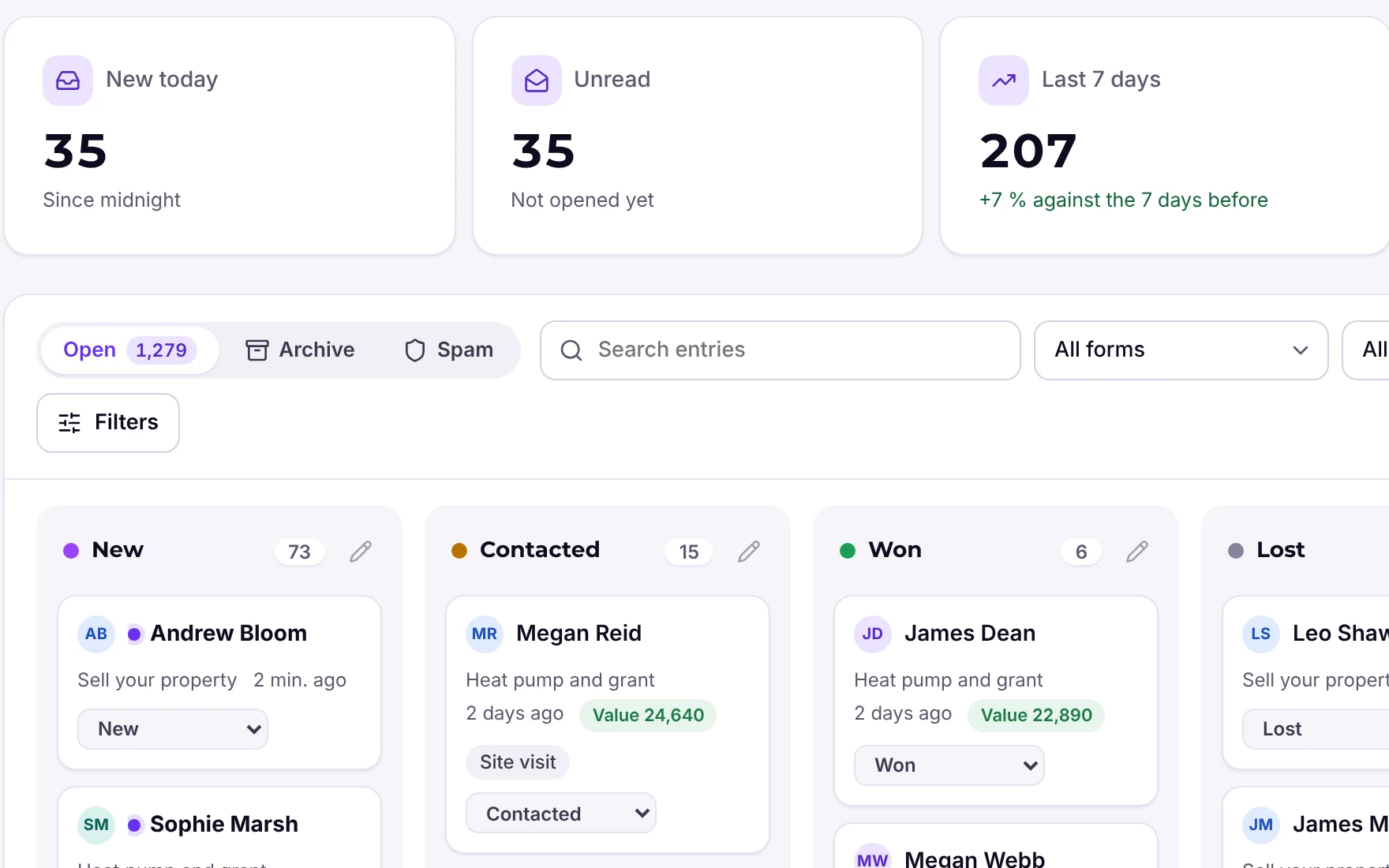
You set up the connection once and it is available in all forms. For deals or your own flows, use webhooks, Zapier, Make and n8n. And as long as you do not need a CRM yet, move enquiries through your own stages to Won in the Funnelforms Pro lead board.
Frequently asked questions
What does Pipedrive cost?
Per seat per month billed annually: Lite $14, Growth $39, Premium $59 and Ultimate $79. Monthly billing costs more (as of November 2026, check with the provider).
Is Pipedrive free?
No, but you can test it free for 14 days.
What does Funnelforms create in Pipedrive?
Funnelforms Pro creates a person with a note containing the answers from the form. For further flows, use webhooks, Zapier, Make and n8n.